Part 1. Planning and accessibility lead
"Putting a remote interpreter on screen is only the start. Confirm each participant’s communication method and an alternative support route first."
- Check individual communication preferences: U.S. Department of Justice effective communication guidance says the nature, length and context of communication, as well as the person’s usual method, matter when choosing support. Sign-language interpretation is appropriate for someone who uses sign language; another person with hearing loss may need captioning or another method. Ask about required support and contact preferences during registration.
- Limit sharing of accessibility information: Share registration responses about communication support and contact preferences only with the event accessibility lead and only to the extent needed for their work.
- Consider on-site interpretation and retain organiser responsibility: If the venue makes a remote screen difficult to see or prevents appropriate positioning of the participant and screen, promptly discuss alternatives, including an on-site interpreter, with the participant and interpretation provider. Do not leave the participant solely responsible for deciding whether the arrangement is suitable.
- Distinguish overseas guidance from domestic legal obligations: The U.S. Department of Justice’s video remote interpreting guidance is a practical reference; do not present it as a numerical legal standard or mandatory rule for events in Korea. Check the applicable requirements and service contract separately for each event.
Part 2. Video, audio and interpreting technical team
"A working screen is not enough. Check the visibility of faces and fingers and the audio in both directions."
- Provide a clear image and trained operators: The U.S. guidance describes a sufficiently large, clear image showing both the participant’s and interpreter’s faces, arms, hands and fingers; smooth video; audible speech; and staff trained to set up and operate the equipment promptly. Using this guidance as a reference, arrange on-site technical staff to install and operate the equipment.
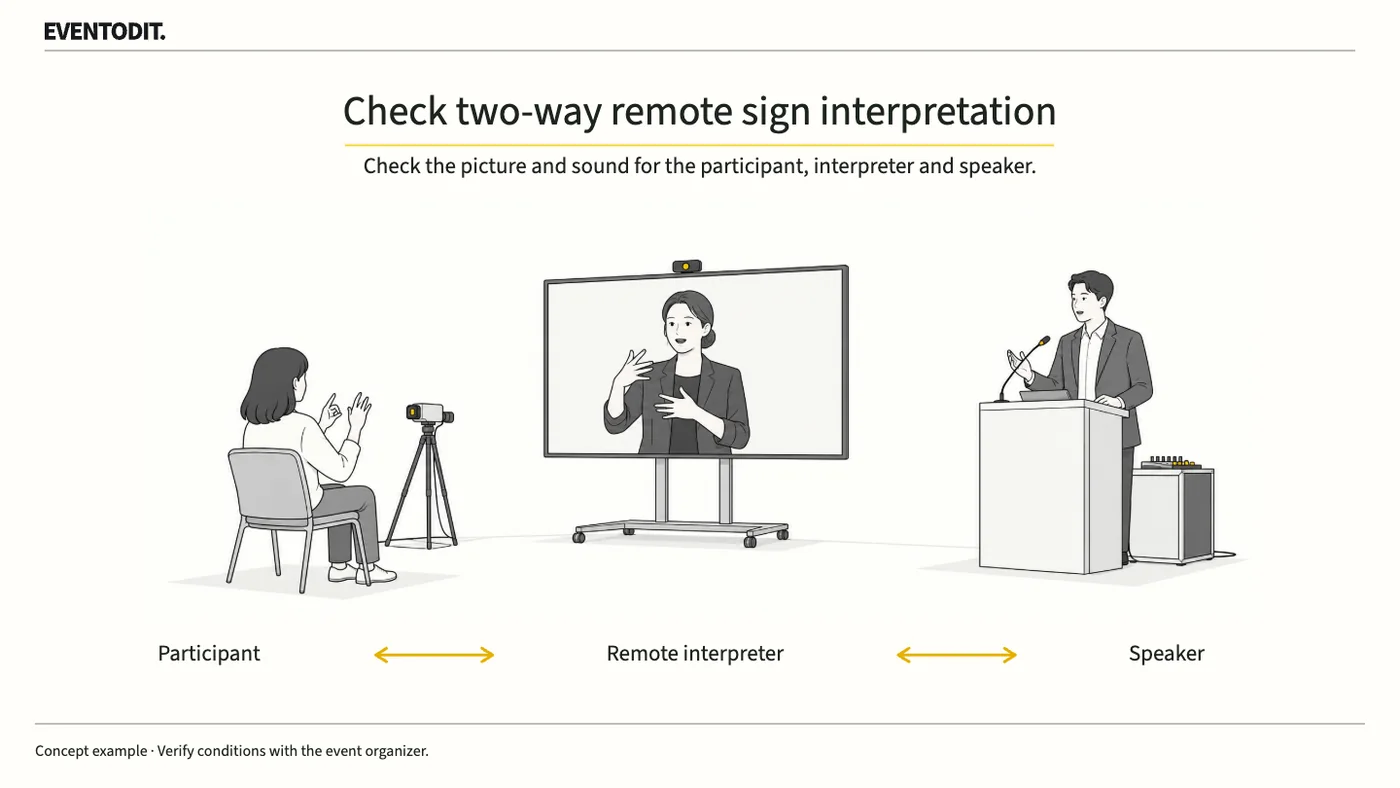
- Rehearse visibility from the actual position: Use the same display, network and camera positions planned for the event. From the seat or standing position the participant will actually use, check that the interpreter’s hands and facial expressions are unobstructed and visible. Check the return camera framing so the interpreter can also see the participant’s signing.
- Test the full two-way exchange: Do not end acceptance after checking that the interpreter appears on the audience screen. Test that the participant’s question reaches the interpreter accurately, the interpretation is audible to the presenter, and the presenter’s answer returns through the interpreter to the participant.
- Respond promptly to delay or audio loss: If the image lags or audio cuts out, promptly investigate with the provider and prepare another support arrangement that can be activated on site.
Part 3. Session and on-site operations
"Prepare for a connection failure. Agree in advance who can adjust the session and who will connect alternative support."
- Follow the three-stage process and completion criteria: Around registration, the accessibility lead confirms the participant’s preferred communication and contact methods. At rehearsal, video and audio staff check the two-way picture, sound and actual viewing position. For an interruption, the session lead designates the person who will report the disruption and connect alternative support.
- Establish a session adjustment protocol: Technical staff should pass test results and unresolved issues to the session lead. The lead should decide beforehand how to pause or adjust the session if the remote connection fails.
- Separate technical testing from user validation: If the actual participant has not checked accessibility on site, do not record the technical transmission test as completed user validation. Keep unconfirmed items open.
- Document and hand over unconfirmed conditions: Do not treat an unverified service quality or participant’s individual preference as a common standard. Record rehearsal results and the people responsible for interruption response in the official operations handover.
| Check | Responsible person | Completion criterion |
|---|---|---|
| Registration | Accessibility lead | Communication and contact preferences confirmed |
| Rehearsal | Video and audio team | Two-way image and sound tested from the actual position |
| Interruption | Session lead | Person assigned to report the disruption and connect alternative support |
Scroll sideways if needed to read every column.
The table is EVENTODIT’s suggested process. The organiser should confirm the procedures and responsibilities for each event.
Use the form for the next handover
Use the [Remote sign-interpreting communication checks](/en/templates/remote-sign-interpretation.html) for the records described here. The XLSX contains Blank, Example and Instructions sheets. Write your event in Blank; the fictional example is a guide to what to enter.
Record only necessary communication needs and identify actual positions. Test face/hands, reverse views and the complete Q&A loop.
Access staff send minimum necessary requirements to interpretation and technical staff. Programme staff take over unresolved issues and connection-loss procedures.
Final check before use: Before participants enter and the event begins, cross-check that individual communication preferences, two-way interpreted video and audio from the actual seat, and session adjustment and alternative support procedures for a system interruption are recorded without omissions.
Conditions for applying this elsewhere
An editorial recommendation informed by U.S. Department of Justice guidance, not a Korean legal standard.
Information not established
No specific Korean event service or participant preference was tested.
Reference material
Have a correction or additional evidence? Request a correction