Part 1. Planning and Procurement Lead
"More important than equipment specifications is whether the audience in the back row can read the actual material."
- Set equipment criteria according to purpose: First define whether the event's visuals are simply for atmosphere or for presentations containing small numbers and text that must be read.
- Prepare test material for the worst case: When sending material to the supplier for an equipment test, provide a page with the smallest-font table or subtitles that will be used during the event, rather than the most beautifully designed screen.
- Do not rely blindly on specifications; agree on acceptance criteria: Specification sheets and sample photographs cannot fully substitute for the actual environment. Before ordering, agree with the video lead on clear, visually verifiable acceptance criteria, such as "the key table can be read from the back row."
- Order based on common conditions: When comparing LED and projection equipment, give rental suppliers the same assumptions for both systems, including the scope of the order, installation conditions, and operating hours, so that the proposals can be compared accurately.
Scroll sideways if needed to compare the branches.
- Review LED proposalActual size, resolution, pixel pitch, controller and support scope
- Review projection proposalModel, lens, screen, projector position and support scope
Part 2. Video and Technical Director
"Brightness does not guarantee a workable installation. Calculate the space's infrastructure first."
- Calculate the relationship between projection lens and space: The projector model's specifications, lens type, throw distance, and screen size must work together. Even with the same screen size, feasibility depends on the installation position. Mark the beam's projection path on the plan in advance and check that lighting, stage elements, and people's routes do not intersect it.
- Obtain approval for LED support and electrical conditions: A bright, clear screen is of no use if its support cannot bear the load or the power supply is insufficient. Confirm operating conditions in advance with the facility manager—including support for the LED panel load, the power required to run it, and controllers—and obtain formal approval.
- Check environmental factors at the event time: Conduct the on-site test at the same time of day as the actual event to determine precisely how incoming daylight and the venue's ambient lighting affect screen visibility.
Part 3. Floor Operations and Stage Manager
"There will always be blind spots in the audience's view. Walk around and check them yourself."
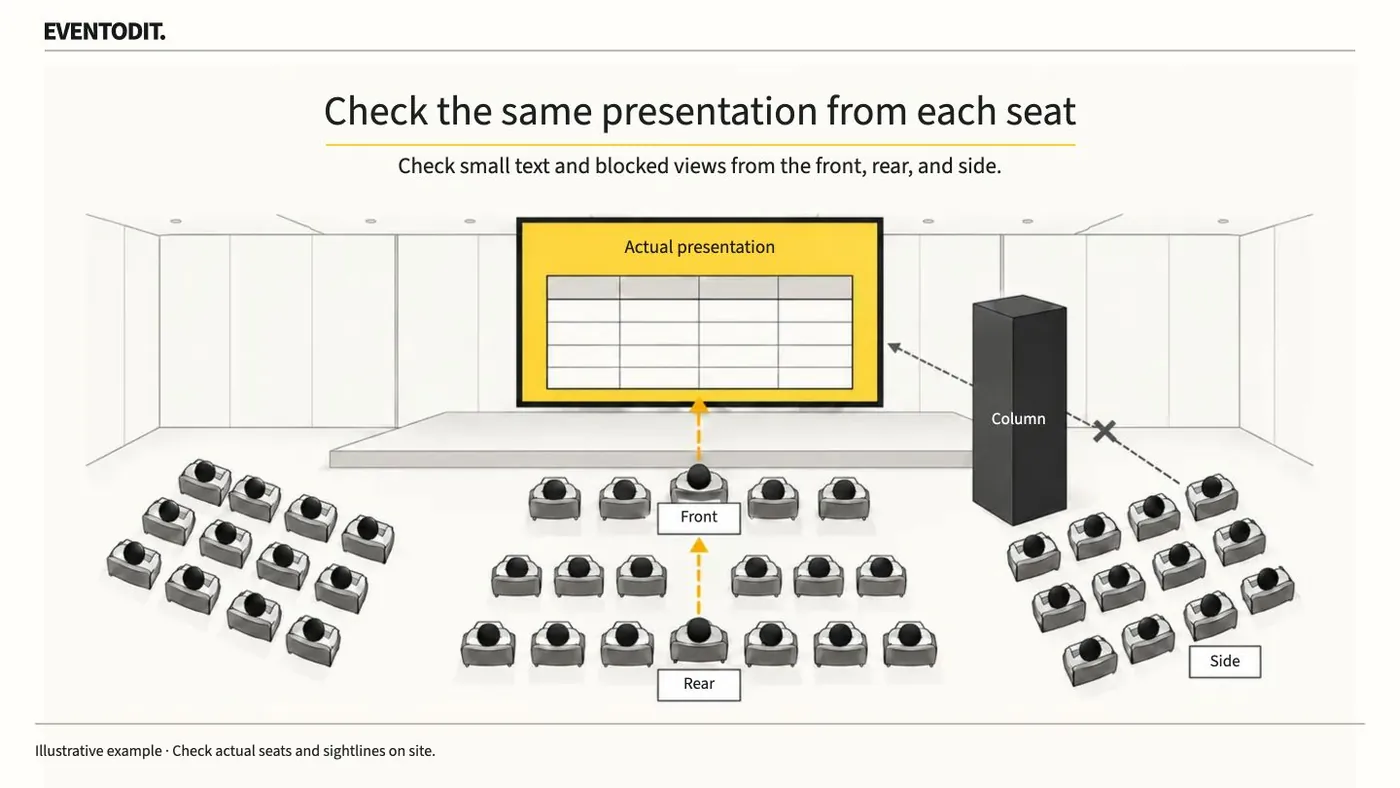
- Check sightlines from several angles and seat positions: Do not check only from center stage or the best seats. In the front rows, check whether pixel pitch is conspicuous, whether the screen is too high, and whether heads in front obscure subtitles at the bottom. From the rear, check that the smallest information remains clear and legible; from the sides, check for obstructed seats where columns or speaker towers block the screen. Mark all these positions clearly on the plan and repeat the checks with the same material displayed.
- Consider adjusting content before replacing equipment: Do not immediately switch to more expensive equipment or a larger screen when visibility is poor. First try increasing font size, reducing the amount of text, and adjusting the screen layout, then check the revised material again. Only if the problem remains should you discuss changing the screen position or equipment with the video lead.
Operational workflow
- Prepare content and agreed criteriaChoose the smallest table text and captions. Align the viewing purpose and the procurement, installation and operating conditions used by each supplier.
- Check installation conditions and venue approvalVideo and venue staff review the lens, throw distance and path, or the LED structure, loads, power and control requirements.
- Test the same file from front, back and sidesUnder event-time light levels, check text, numbers, blocked captions, pixels and obstructed seats, and mark the results on the plan.
Hard to read
Readable
- Compare and assess under verified conditionsRecord the content, seats, screen configuration and operating scope. Compare supplier proposals under the same conditions.
Do not finalize operation with installation conditions unverified or unapproved. Retest the real content rather than assuming an equipment change makes it readable.
Final check before use: Before each team's staff and the video system are brought into the venue, check to ensure that no sightline review or equipment procurement items identified in this manual have been missed.
Conditions for applying this elsewhere
Do not decide on pixel pitch or brightness alone. Confirm throw, lens and ambient light, or LED structure, power and load-in, with facilities and technical personnel.
Information not established
No universal suitable pitch, brightness or screen size is proposed. Playback in the actual environment and structural and electrical approvals remain necessary.
Reference material
Have a correction or additional evidence? Request a correction